TV Wall Mount Buying Guide for Large TVs (75 to 100 Inch)
Last updated: May 2026 • 6 minute read
Mounting a large television is not the same job as mounting a 43-inch screen. A 75-inch TV can weigh 30 to 45 kilograms. A 100-inch panel can cross 80 kilograms. The wrong mount sags within months, scratches the back of the panel, or — in the worst case — comes off the wall entirely.
This guide walks through everything that actually matters when picking a wall mount for a 75, 85, or 100-inch TV. By the end, you will know exactly what to look for, what to ignore, and which mount makes sense for your TV.
What this guide covers
How Much Does Your TV Actually Weigh?
This is where most people get the buying decision wrong. They assume a mount rated "up to 100 inches" can hold any 100-inch TV. That is not true. Mount ratings are based on weight, not screen size. And large TVs vary a lot in weight depending on whether they are LED, OLED, or Mini-LED.
Here are typical weight ranges for popular large-TV sizes in the Indian market:
| TV Size | LED (typical) | OLED (typical) | Mini-LED / QLED (typical) |
|---|---|---|---|
| 75 inch | 30 – 35 kg | 25 – 30 kg | 35 – 45 kg |
| 85 inch | 40 – 50 kg | 35 – 40 kg | 50 – 60 kg |
| 98 / 100 inch | 60 – 70 kg | — | 70 – 85 kg |
The rule of thumb: pick a mount rated for at least 1.5x your TV's weight. A 50 kg TV needs a mount rated for 75 kg or more. This gives a safety margin for the brackets, hardware, and wall over the long term.
The actual weight is printed on the TV's box, in the user manual, and on most manufacturer websites. Search "[your TV model] specifications" and look for the line that says "Weight without stand."
VESA Patterns Explained (And Why They Matter)
VESA is the standard hole pattern on the back of every TV that determines what mount will fit. It is measured in millimeters — width by height — between the four mounting holes.
For example, a TV labeled "VESA 600 x 400" has four holes arranged 600mm wide and 400mm tall. The mount you buy must support that exact pattern, or a range that includes it.
Typical VESA patterns for large TVs:
| TV Size | Common VESA Pattern |
|---|---|
| 75 inch | 400 x 400 or 600 x 400 |
| 85 inch | 600 x 400 or 800 x 400 |
| 98 / 100 inch | 800 x 400 or 800 x 600 |
How to find your TV's VESA pattern:
- Look at the back of the TV. There will be four threaded holes in a rectangle.
- Measure the horizontal distance between the two holes (in mm). That is the first number.
- Measure the vertical distance (in mm). That is the second number.
- Check your TV manual — VESA is always listed in the spec sheet.
If your TV has a VESA pattern of 800 x 400 and the mount you are considering only supports up to 600 x 400, that mount will not fit. Always confirm before purchasing.
Fixed, Tilt, or Full-Motion — Which to Choose?
There are three main types of TV wall mounts. Each one solves a different problem.
| Mount Type | What It Does | Best For | Trade-off |
|---|---|---|---|
| Fixed | Holds TV flat against the wall | Bedrooms, simple installs, low budget | Cannot adjust angle once mounted |
| Tilt | Allows up/down tilt only | TVs mounted higher than eye level (e.g. above a fireplace) | No side-to-side movement |
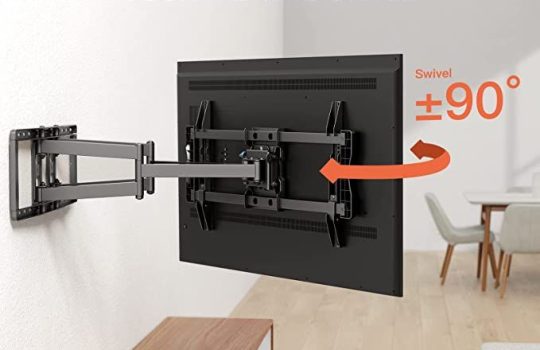
| Full-Motion | Tilt, swivel, and extend from the wall | Large rooms, open living areas, viewing from multiple angles | More expensive, requires sturdier wall |
For a 75 to 100-inch TV in a living room or media room, a full-motion mount is almost always the right choice. Here is why:
- Large TVs are usually the centerpiece of an open living area. People watch from the sofa, the dining table, and sometimes the kitchen.
- Cable management is much easier with a mount that extends from the wall.
- Service and cleaning behind the TV is far easier when the mount can pull the TV forward.
- Reflections can be killed by angling the TV slightly when needed.
The only reason to go with a fixed mount for a large TV is budget. And honestly, after spending lakhs on a 75 or 85-inch panel, saving a few thousand on the mount is the wrong place to cut corners.
Wall Type Matters More Than You Think
A mount is only as strong as the wall behind it. Indian homes have three main wall types, and each one needs different installation:
Concrete / RCC walls: The strongest and most common in Indian homes. A properly installed mount with the right anchors can easily hold a 100kg TV. This is the ideal wall for large TVs.
Brick walls: Common in older homes. Solid bricks hold mounts well; hollow bricks do not. If you are not sure, drill a small test hole — solid brick gives uniform resistance, hollow brick gives a "puff" of dust and easy drilling.
Drywall / gypsum board: Common in newer apartments and offices. Drywall on its own cannot hold a large TV. You must mount into the wooden or metal studs behind the drywall, or use a backing plate that distributes the weight.
If you have any doubt about your wall type, ask your installer to check before purchasing the mount. Mounting an 85-inch TV onto an unsuitable wall is a guaranteed disaster.
The 7-Point Checklist Before You Buy
Run through this list before placing any order:
- TV weight: Confirmed from the manufacturer's specs (not estimated)
- Mount weight rating: At least 1.5x the TV weight
- VESA pattern: Mount supports your TV's exact VESA
- TV size range: Your TV size falls within the mount's specified range
- Wall type: Wall confirmed to be strong enough; correct anchors planned
- Cable management: Mount has cable routing or you have a plan for it
- Service access: Mount can extend forward enough for you to reach behind the TV
If all seven boxes are ticked, you are ready to buy.
Our Recommended Mount for 75 to 100-Inch TVs: The Tono LPC-04
Tono LPC-04 Full-Motion Wall Mount
The LPC-04 is engineered specifically for the demands of 75 to 100-inch displays. Most mounts in the Indian market are rebadged generic units from overseas catalogs — the LPC-04 is designed and built in our Thane facility for Indian homes, walls, and TV models.
Key specifications:
- TV size range: 75 to 100 inches
- Load capacity: Up to 100 kg
- VESA support: Up to 800 x 600 mm
- Movement: Full-motion — tilt, swivel, extension from wall
- Construction: Cold-rolled steel with corrosion-resistant finish
- Cable management: Integrated cable channels
- Mounting hardware: Includes wall fasteners for concrete walls
Why we built it this way: Most Indian living rooms have concrete or brick walls and seating that goes 8-12 feet wide. A mount for a large TV in this setting needs three things: enough weight rating for the TV plus a safety buffer, swivel range to serve viewers across that wide seating arc, and rigid construction that does not flex even at full extension. The LPC-04 was designed around these specifics.
Have a 77-inch OLED TV? Check out our LPC-501 180° Swivel Mount — purpose-built for OLED panels with full 180-degree swivel range, ideal for L-shaped living rooms and open-plan spaces.
Frequently Asked Questions
What is the maximum TV size for a wall mount?
Wall mounts are available for TVs up to 100 inches. The Tono LPC-04 supports up to 100-inch displays. For larger commercial displays (110-inch and above), specialized installations are required.
How much weight can a TV wall mount hold?
It depends on the model. Mounts for large TVs typically support 50 to 100 kg. The Tono LPC-04 is rated up to 100 kg. Always confirm that your mount's weight rating is at least 1.5 times your TV's actual weight.
Can I mount a 100-inch TV on a drywall partition?
Not directly. Drywall alone cannot hold a 100-inch TV. You must either mount into the studs behind the drywall using long screws, or use a backing plate that spans multiple studs. In most cases, a 100-inch TV should be mounted on a concrete or brick wall.
What VESA mount do I need for a 75-inch TV?
Most 75-inch TVs use a VESA pattern of 600 x 400 mm, though some are 400 x 400 mm. Check your TV's user manual or the manufacturer's website. The Tono LPC-04 supports patterns up to 800 x 600 mm, covering all common 75 to 100-inch TVs.
Is it safe to install a TV wall mount myself?
For TVs under 55 inches, careful DIY installation is possible. For TVs 75 inches and above, professional installation is strongly recommended. Large TVs require accurate stud detection, proper anchor selection, and a second person to safely lift and mount the panel.
What is the difference between a fixed and full-motion mount?
A fixed mount holds the TV flat against the wall with no adjustment. A full-motion mount allows the TV to tilt up and down, swivel left and right, and extend out from the wall. For large TVs in open living spaces, a full-motion mount is almost always the better choice.
Will the LPC-04 work with my Samsung / LG / Sony 85-inch TV?
Yes, as long as your TV's VESA pattern is 800 x 600 mm or smaller and the TV weighs under 100 kg. This covers virtually all 75 to 100-inch consumer TVs from Samsung, LG, Sony, Mi, OnePlus, and other major brands.
Ready to mount your large TV?
The Tono LPC-04 is in stock and ships across India with full installation guidance. We also support dealers and AV integrators with project pricing and site survey assistance.
View the LPC-04 → Talk to our team
Related guides on Tono Systems: