Ceiling-Mounted Conference Room Cameras: A Buyer’s Guide to Getting Video Right (and Out of the Way)
If you’re outfitting a conference room for video calls, the camera is the decision everyone underestimates. Teams and Zoom make the software easy. The hardware — where the camera goes, how it’s mounted, how it pairs with audio, and how the room looks when you’re done — is what separates a room people want to meet in from one they tolerate.
This guide walks through how to choose a conference room camera, why ceiling mounting solves problems that wall and display mounts can’t, and where a motorized PTZ camera lift fits in.
Start with the three things that actually matter
Most conference room camera searches come down to the same short list of concerns. Get these right and the rest is detail.
Platform compatibility. Your camera has to work cleanly with whatever you run meetings on — Microsoft Teams, Zoom, Google Meet. Most quality conference cameras are USB or IP-based and platform-agnostic, but it’s worth confirming certification for your platform before you buy.
Audio is half the camera decision. Buyers almost never shop for a camera alone — they shop for a camera and a microphone and a speaker. Plan the full capture chain: a camera that frames the room and audio that covers it. A great picture with muddy sound still ends the meeting early.
Coverage and framing. A PTZ (pan-tilt-zoom) camera earns its place in mid-to-large rooms because it can pan across a table, zoom to the active speaker, and recall preset positions. For a small huddle room, a fixed wide-angle camera may be plenty. Match the camera’s field of view and zoom to the size and shape of the room.
The mounting problem nobody plans for
Here’s where good rooms go wrong. The camera gets clamped to the top of the display or screwed into the wall, because that’s the obvious spot. But that location often means:
- The camera looks across the room instead of into it, so people appear to be glancing away.
- The display, the camera, and a tangle of cables all compete for the same wall.
- The hardware is permanently on show, which undercuts an otherwise polished room.
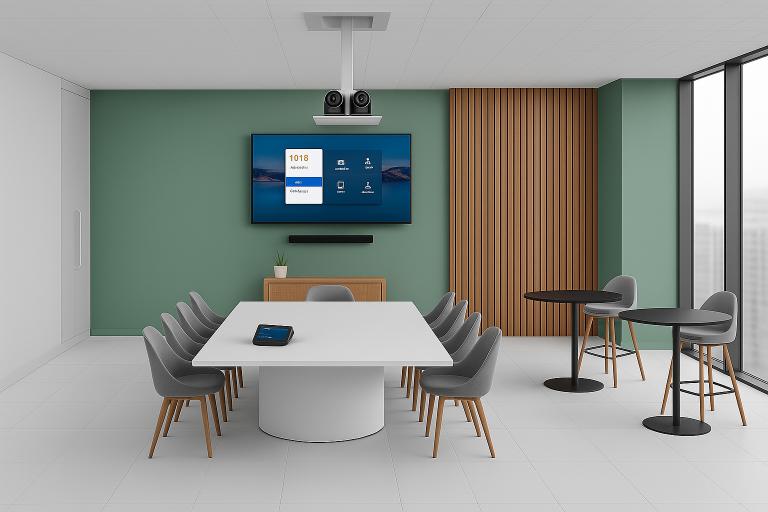
Ceiling mounting fixes the sightline and the clutter at once. A ceiling-mounted conference camera looks down into the room at a natural angle, keeps cabling out of view, and frees the wall for the display. It’s why “ceiling mounted conference room camera” and “how to mount a camera on the ceiling” are such common searches — people sense the wall mount isn’t ideal and go looking for a better option.
Where a motorized PTZ camera lift comes in
A ceiling mount solves the sightline. A motorized ceiling lift solves everything else.
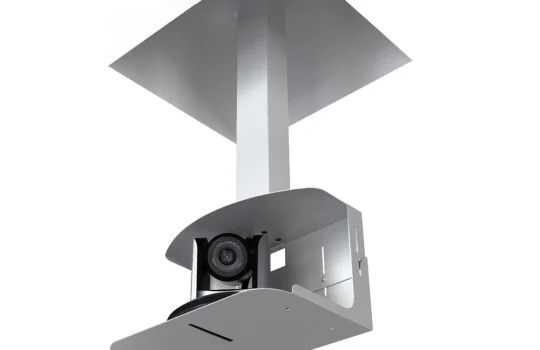
A camera lift holds your PTZ camera in the ceiling and lowers it into position when a meeting starts, then raises it back out of sight when you’re done. You get the ideal ceiling angle and a room that looks camera-free between calls.
The Tono camera lift is built for exactly this. When you don’t need it, the camera sits in the ceiling, keeping the space clean. When it’s time to meet, a push of a button brings it down smoothly and quietly, ready to go — and because it returns to the same position each time, your framing is consistent call after call.
A key point for buyers who’ve already chosen a camera: the lift isn’t a replacement for your Logitech, Poly, or other PTZ camera — it’s how you mount it. The Tono lift works with many types of video-conferencing cameras and fits into your existing setup, so you keep the camera you trust and simply give it a better home. It runs on a standard 110V supply, compatible with U.S. installations.
Is a ceiling lift overkill for your room?
Honest answer: sometimes. A small huddle room with a fixed webcam on the monitor may not need one. A lift makes the most sense when:
- The room is client-facing or executive, and appearance matters between meetings.
- The room is multipurpose, used for in-person sessions as often as video calls.
- You want repeatable, professional framing without anyone adjusting hardware.
- The ceiling angle genuinely improves your shot over a wall or display mount.
If those describe your space, a lift moves from “nice-to-have” to the obvious choice.
Frequently asked questions
What’s the best conference room camera for Microsoft Teams or Zoom? The best camera is one certified or proven for your platform, sized to your room, and paired with capable audio. PTZ cameras suit mid-to-large rooms; fixed wide-angle cameras suit huddle spaces. Whatever you choose, plan the microphone and speaker alongside it.
Do I need a separate microphone and speaker? Usually, yes — especially in larger rooms. Some all-in-one bars combine camera, mic, and speaker for small spaces, but mid-to-large rooms generally benefit from dedicated audio so everyone is heard clearly.
Can a PTZ camera be ceiling-mounted? Yes. Ceiling mounting is a common and often superior choice for conference rooms because it improves the sightline and hides cabling. A motorized lift takes it further by concealing the camera entirely when it’s not in use.
How do you mount a conference camera in the ceiling? The camera attaches to a mount or lift housed above the ceiling line, with cabling routed out of sight. Because a clean ceiling install affects the finish, the wiring, and the warranty, professional installation is strongly recommended.
Is a motorized camera lift noisy? The Tono lift is designed to lower and raise the camera smoothly and quietly, so it doesn’t interrupt the room.
Will a camera lift work with the camera I already have? In most cases, yes. The Tono lift supports many types of video-conferencing cameras and integrates with existing setups, so you can keep your current PTZ camera.
The takeaway
A conference room camera is really three decisions — the camera, the audio, and the mount — and the mount is the one people skip. Putting a PTZ camera in the ceiling gives you a better angle and a cleaner room; putting it on a motorized lift means it’s there the instant you need it and invisible the rest of the time.
If you’re specifying a new conference room or upgrading an old one, talk to us about how a Tono camera lift can give your chosen camera the best seat in the room — and tuck it away when the meeting’s over.