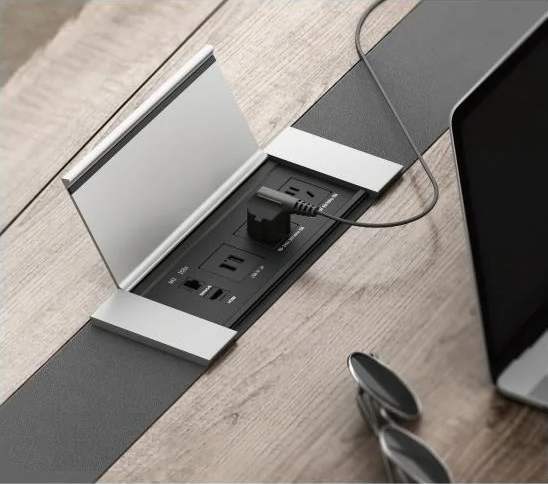
Good under table cable management is what separates a clean, professional boardroom from a tangle of cords across the floor. On a conference table, power and data cables must reach every seat. They should not cross the surface or trail across the room. The fix is a planned system that routes everything beneath the table, out of sight and out of the way.
This guide covers under table cable management for conference and boardroom tables. It explains what the system includes, why it matters, and how to set it up. It focuses on the professional, AV-driven setup rather than a single desk tray, and it points to the right conference table power module for the job.
What under table cable management means for a conference table
Under table cable management is the set of components that carry power and data below the tabletop. They run back to the wall or floor. It starts at the surface, where a power module or grommet lets cables drop through. It continues underneath, where raceways, trays, or a central spine guide them to the outlet.
This is different from the module you see on top of the table. The tabletop unit gives users sockets and ports. The under-table part is everything that hides and routes the cables once they leave that unit. A complete conference table cable management setup needs both.
Why it matters in a boardroom
Loose cables under a meeting table cause three problems. They look unprofessional, they create a trip hazard around chairs and feet, and they strain connectors every time someone uses the table. Good routing solves all three.
There is a technical reason too. Power cables and data cables should run on separate paths. Keeping them apart reduces electrical interference, which protects audio clarity and video quality on the AV system. Electromagnetic interference is a real factor in rooms with 4K displays and microphones. So the layout under the table is about more than tidiness.
The parts of an under-table system
A reliable conference table cable management system has four layers:
- Tabletop power module. A pop-up or flip-up unit that gives users power and data without cluttering the surface.
- Grommet or cable port. The opening that lets cables drop cleanly through the tabletop.
- Under-table routing. Raceways, trays, or a central spine that carry cables along the underside of the table.
- Floor or wall connection. A floor box or wall outlet that feeds the table its power and data.
Tono’s power and cable management module handles the first two layers and feeds neatly into the routing below.
How to manage cables under a conference table
A clean install follows a simple order:
- Plan the outlet first. Decide where the floor box or wall feed sits before you place the table.
- Route along the spine. Carry cables along the table’s central beam or perimeter frame, not loose across the underside.
- Separate power and data. Run the two on different paths to limit interference.
- Leave a service loop. Keep a little slack at each end so nothing pulls the cables tight.
- Label both ends. Mark each cable so a fault is quick to trace during a meeting.
These steps turn a messy under-table space into a system anyone can maintain. They also make good under table cable management repeatable across every room you fit out.
Where the Tono power module fits
Most under table cable management problems start at the surface. If you place the tabletop unit poorly, every cable below it suffers. A well-designed conference table power module sets the cables on the right path from the start, so the routing underneath stays simple.
For a boardroom build, pair the module with a planned floor box and tidy routing. To match the right module to your table and room, talk to a Tono specialist.
Common mistakes to avoid
- Mixing power and data on one path. This invites interference and signal problems.
- No service loop. Tight cables pull on connectors and fail early.
- Poor grommet placement. A port too far from the floor box means long, visible cable runs.
- Loose cables with no tray or spine. They sag, tangle, and catch on chairs.
Frequently asked questions
How do you hide cables under a conference table?
Drop them through a tabletop power module or grommet, then route them along the table’s spine or perimeter to a floor box or wall outlet. Trays or raceways keep the run tidy.
What is the difference between a cable cubby and a power module?
“Cable cubby” is a brand name for a tabletop connectivity box. A power module does the same job. It gives users power and data at the table and feeds cables cleanly below the surface.
How do you separate power and data under a table?
Run them on different routes along the underside of the table, ideally on opposite sides of the spine. This limits electrical interference and protects AV quality.
Do you need a floor box for a conference table?
For a fixed boardroom table, a floor box is the cleanest feed. It brings power and data up to the table with no cable crossing the room.